Servers
The Department of Meteorology and Geophysics has access to the following computing resources:
- Teaching Server SRVX1
- Development Server Aurora
- Services Server SRVX8
- Computing Cluster JET
- Vienna Scientific Cluster VSC
Available Work Environments
Locations:
- Students SRVX1, TeachingHub + MasterHub
- Staff Development Aurora
- Staff + Remote Desktop + Jupyterhub Jet Cluster
- Staff Vienna Scientific Cluster (VSC)
- VSC Training
- VSC Trainings @ IMGW
Note: Please take a look at the training course @VSC. There might be a beginners course about Linux or Clusters or Python! It is highly recommended to use these existing courses to get up to speed. Most of these are available as pdfs right away, but still taking the course is the prefered way.
Access to different servers
| server | access | purpose | comment |
|---|---|---|---|
| TeachingHub (SRVX1) | u:account | students | access via moodle |
| MasterHub (SRVX1) | w:account | masters | access by supervisor |
| Aurora | w:account | masters, staff, external | access by supervisor or wiki request |
| JET | w:account | masters, staff, external | access by supervisor or wiki request |
| ECMWF | ec:account | staff | ECMWF Member state, contact supervisor |
| Vienna Scientific Cluster (VSC) | v:account | masters, staff | access by supervisor |
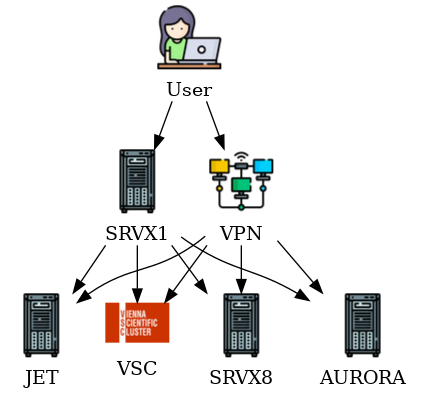
How to connect from Home or Abroad?
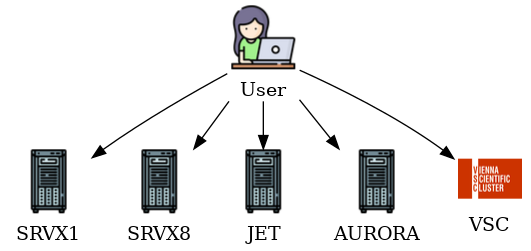
How to connect from the Office?
Services
Summary of services available @IMGW for staff and students. Some of these services require different accounts (info) or nework access.
| name | description | url/path | access | host |
|---|---|---|---|---|
| teachinghub | Jupyterlab for Teaching & Development | teaching.wolke.img.univie.ac.at | web | SRVX1 |
| masterhub | Jupyterlab for Master Students | quell.wolke.img.univie.ac.at | web | SRVX1 |
| ecgateway | ECMWF Member State Gateway | ecaccess.wolke.img.univie.ac.at | img/vpn | JET02 |
| researchhub | Jupyterlab for Development | jupyter.wolke.img.univie.ac.at | img/vpn | JET02 |
| webdata | File server (/srvfs/webdata) |
webdata.wolke.img.univie.ac.at | web | SRVX8 |
| YoPass | Secure Message Service (YoPass) | secure.wolke.img.univie.ac.at | web | SRVX8 |
| TransferSH | Easy commandline file transfer/send | transfersh.wolke.img.univie.ac.at | web | SRVX8 |
| Uptime | Server Monitoring | uptime.wolke.img.univie.ac.at | web | SRVX8 |
| IPA | User Management | wolke.img.univie.ac.at/ipa/ui | img/vpn | WOLKE |
Containers
Containerization is done via singularity/apptainer. There is a repository on gitlab that hosts container definitions and related files. Some of these containers are build and available via the gitlab container registry.
Example
To use a container, you can pull it from the GitLab container registry and run it with singularity/apptainer. Here is a basic example:
| Bash | |
|---|---|
1 2 3 4 5 6 7 8 9 10 | |
Look for more public containers on gitlab container registry.
Integration
Some of these containers are integrated into the module system of the IMGW servers. e.g. module load imagemagick
| example loading imagemagick | |
|---|---|
1 2 3 4 5 6 7 8 | |
Need another application that is not available but too complicated to be served natively on a multi user environment?
Contact IT.